Sky Sync
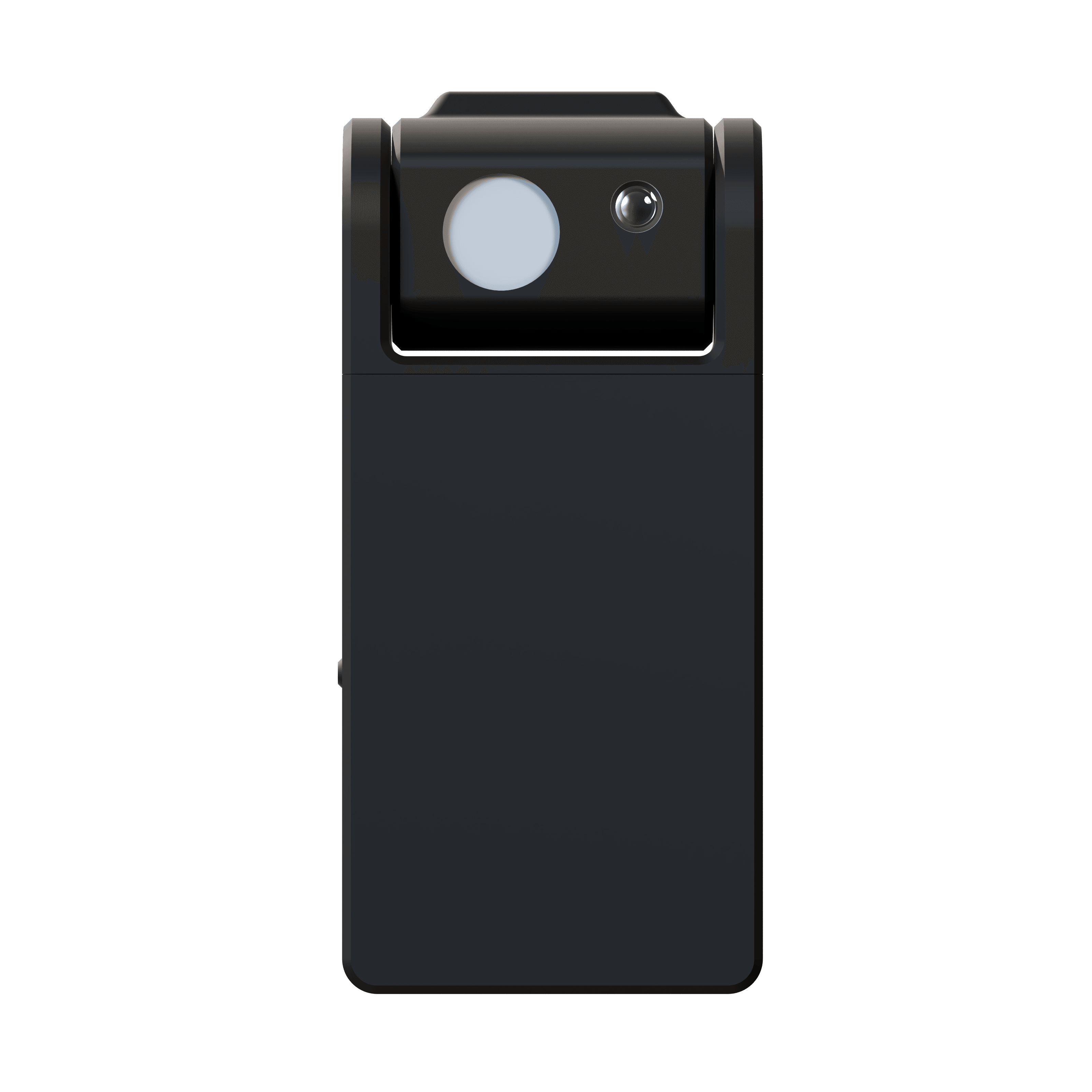
Innerscene SkySync is the first sensor capable of capturing the true color of a blue sky — and bringing it indoors.
Traditional light sensors measure a mix of sunlight, reflections, and sky together, producing white, overcast-looking light at 5,000-6,500K. But the real sky on a clear day? It’s a vibrant 200,000K or higher.
SkySync’s breakthrough dual-sensor technology measures the sky independently from ambient light, streaming real-time color data to your Circadian Sky and Virtual Sun fixtures. As clouds drift by, as the sun moves across the sky, your indoor lighting shifts and responds — making spaces feel alive and breathing in sync with the natural world outside.
With a 10+ year replaceable battery (CR2477) and indoor window mounting, SkySync brings nature’s constantly changing light inside with no wiring required.
Downloads
This product is protected by one or more patents with additional patents pending.
View all patents
Beyond Traditional Ambient CCT Sensors
SkySync is the first sensor that measures true sky color independently — a fundamental breakthrough in architectural lighting
Why Traditional Sensors Miss the True Sky Color
Traditional sensors measure an average of all light sources — resulting in approximately 6,500K. But the sky alone measures 200,000K.
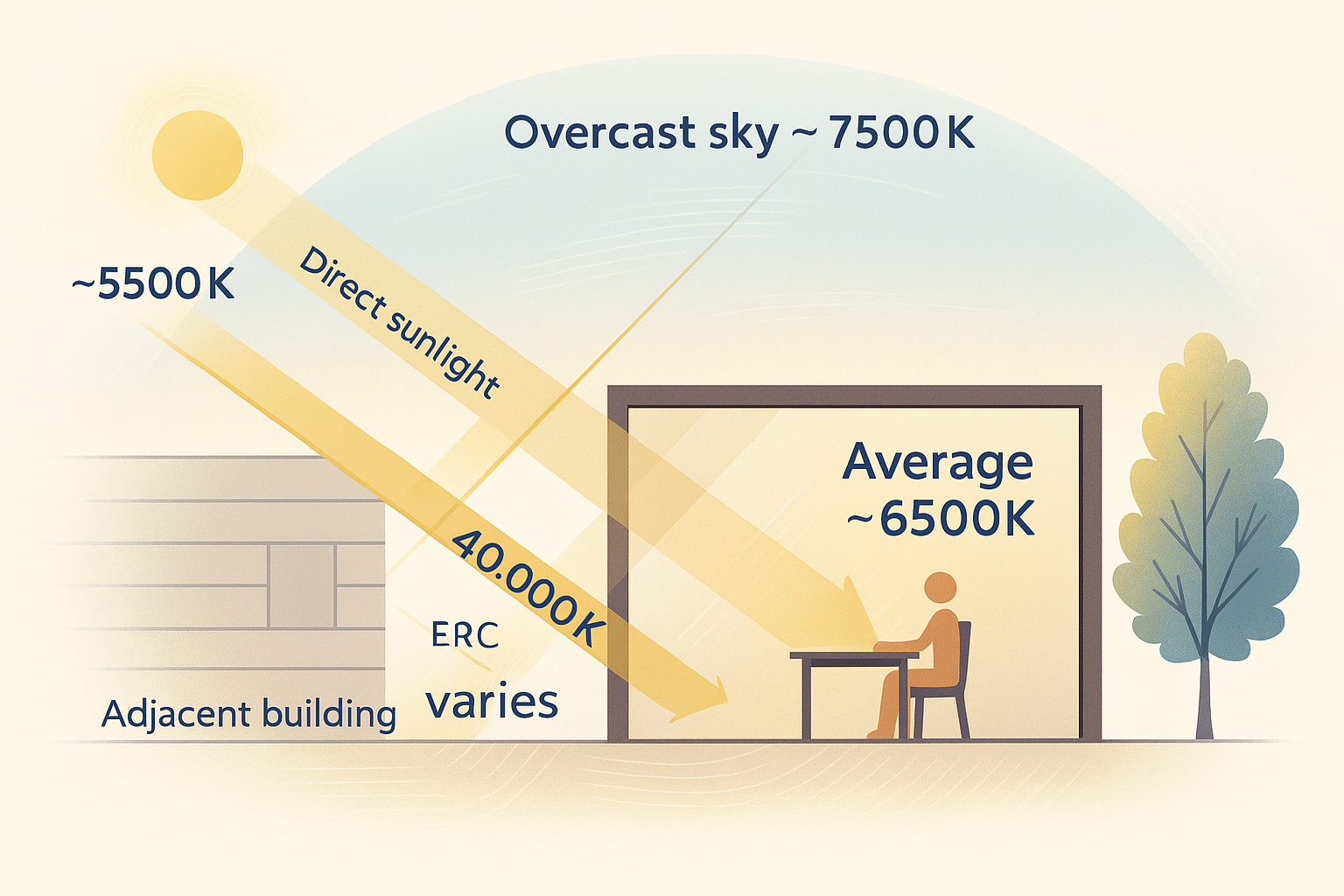
Average CCT: ~6,500K
Traditional sensors measure a mix of direct sunlight (~5,500K), overcast & blue skies, and reflected light from buildings and surroundings — averaging to approximately 6,500K.
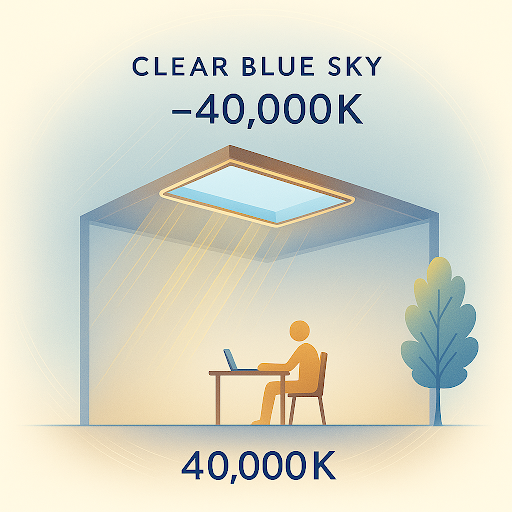
Sky-Only CCT: 200,000K
The sky measured independently has a CCT of 200,000K or higher. This vibrant blue is impossible to replicate without measuring it separately from other light sources.
The Sky is Constantly Changing
This CIE 1931 chromaticity diagram shows real sky color measurements captured throughout multiple days. Each dot represents the sky color at a specific moment — revealing how dramatically the sky shifts every few minutes as clouds pass, the sun moves, and atmospheric conditions change.
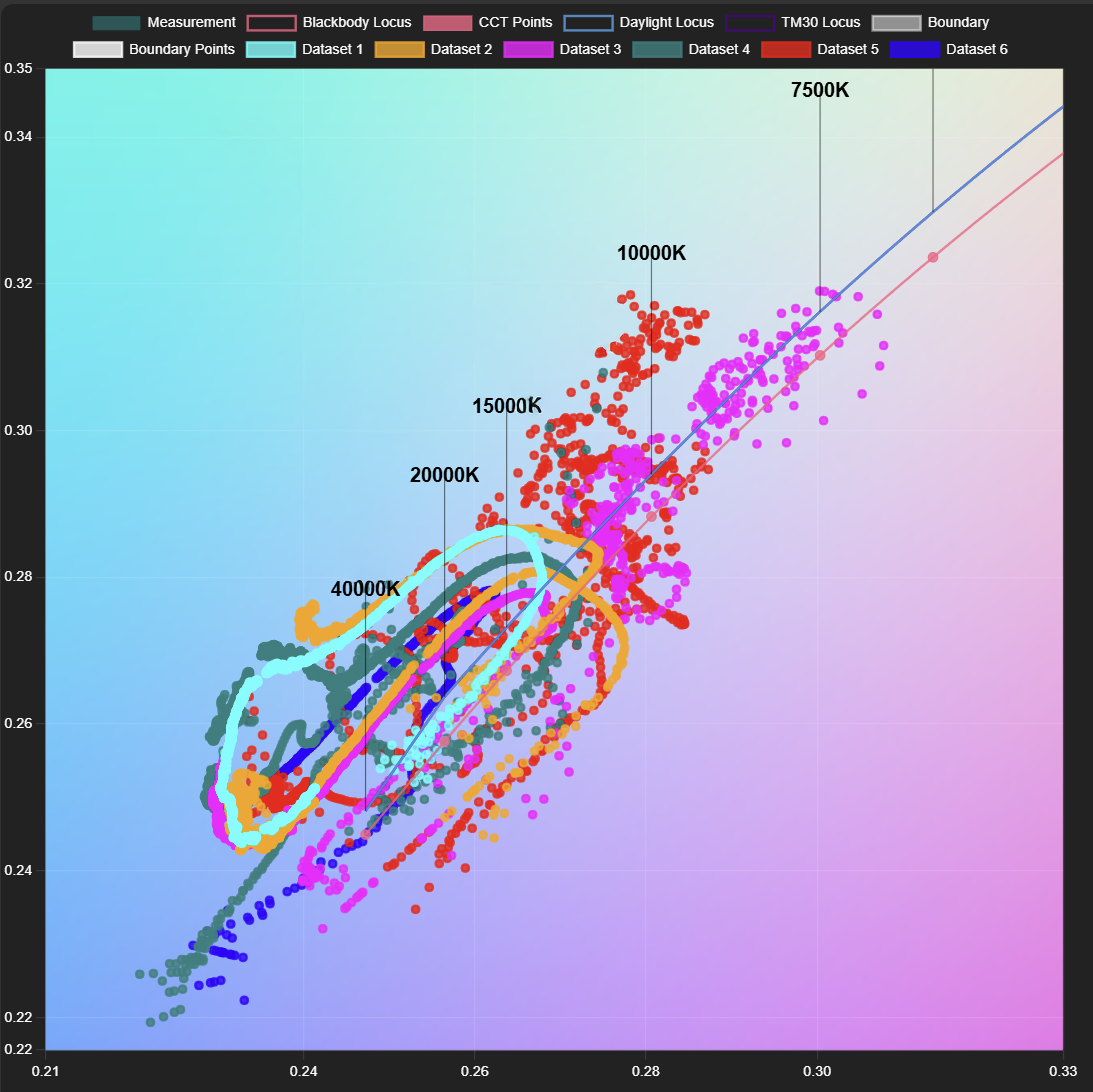
Overcast Days (Red/Pink/Purple Dots)
Sky color ranges from 6,500K to 12,000K, shifting constantly as cloud density and thickness change. Traditional ambient sensors can only capture a static average, missing these dynamic transitions.
Clear Sky Days (Cyan/Blue/Orange/Green Dots)
Sky color centers around 200,000K with continuous variation throughout the day. SkySync captures these moment-to-moment changes, making your indoor lighting feel alive and connected to the world outside.
The Problem with Traditional Sensors
Traditional ambient CCT sensors measure light from all directions — mixing direct sunlight, reflected environmental light, and sky light together.
This produces readings of 5,000-6,500K, appearing white and overcast — far from the vibrant blue of a clear sky at 200,000K+. Without measuring the sky independently, architectural fixtures limited to 6,500K cannot replicate the true color of natural daylight.
SkySync's Dual Sensor Solution
10° Narrow Directional Sensor
Measures true sky color independently, capturing the full range from 6,500K overcast to 200,000K+ blue sky conditions
180° Ambient CCT Sensor
Measures diffuse environmental light from all directions for accurate ambient lighting replication
Communication Architecture
SkySync offers four flexible ways to deliver real-time sky data to your Circadian Sky fixtures, from simple direct wireless to cloud-based remote deployments.
SkySync → Circadian Sky
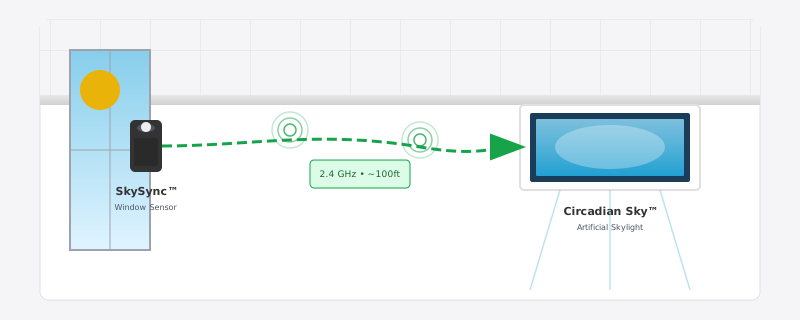
The simplest configuration. SkySync broadcasts directly to nearby fixtures via 2.4 GHz ISM band wireless. No network infrastructure required.
Communication Flow
SkySync transmits sky data wirelessly
Circadian Sky receives data within ~30ft range
✓ Best for: Single rooms or small spaces within range of a window
Direct Wireless
The simplest configuration. SkySync broadcasts directly to nearby fixtures via 2.4 GHz ISM band wireless. No network infrastructure required.
Wireless Relay
The Innerscene Mini Hub receives sky data from SkySync and rebroadcasts it wirelessly on a stronger 2.4 GHz ISM band radio, extending range with no network, router, or on-site configuration. Place the Mini Hub within 30ft of SkySync and within 50ft of a Circadian Sky fixture.
Local Network
Extended coverage using the Innerscene Mini Hub. Use the Innerscene Studio app to connect the Mini Hub and at least one Circadian Sky fixture to your local network; the hub then broadcasts UDP sky data to every fixture on that network.
Cloud Relay
For fixtures in remote locations or separate network segments. Use the Innerscene Studio app to connect the Mini Hub and at least one Circadian Sky fixture to the network, then sky data is relayed through Innerscene Cloud Services.
Need extended range or cloud connectivity?
Learn about Innerscene Mini Hub →Technical Specifications
Advanced sensing technology for precise sky color replication
Sky Sensor FOV
10° narrow field of view
Ambient Sensor
180° diffuse light collector
Wireless Range
30ft direct; 100ft+ with included Mini Hub
Setup Protocol
Bluetooth Low Energy (BLE)
Power
10+ year replaceable battery (CR2477)
Communication
2.4 GHz ISM band (no router required)
IP Rating
IP20 (indoor use only)
Safety
UL 1642 Listed Battery
Dimensions
Compact window-mount
Installation
Removable tape mounting
Wireless Operation
10+ year battery life, with the included Mini Hub for extended range
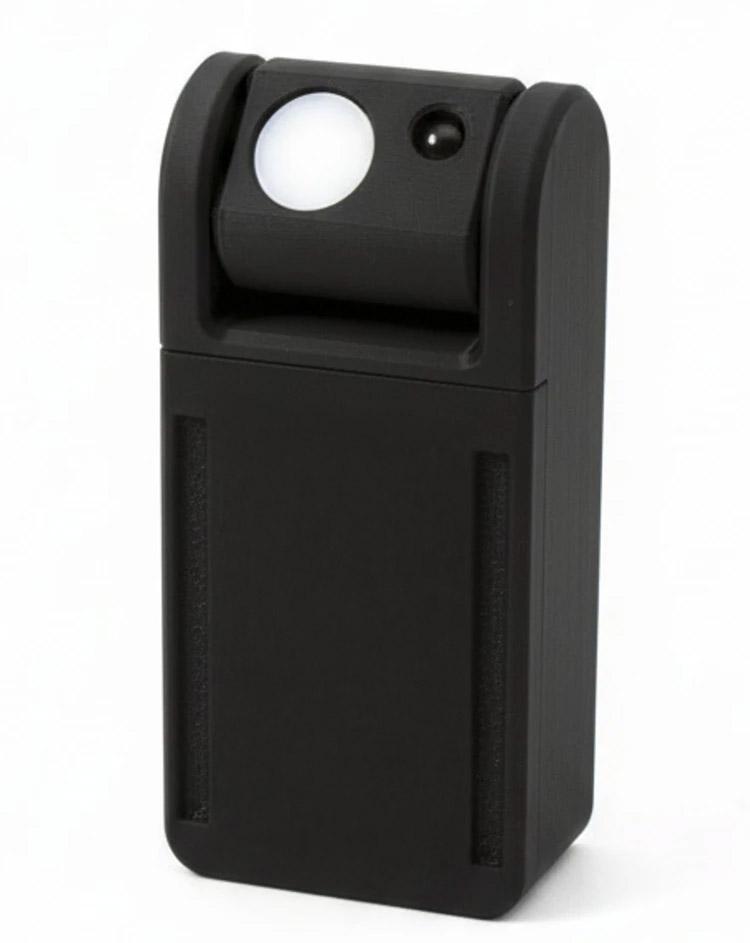
SkySync Sensor
Power
10+ year battery life
Range
30ft with clear line of sight
Communication
2.4 GHz ISM band protocol (no router required)
Ideal for: Single-room installations within 30ft of fixtures
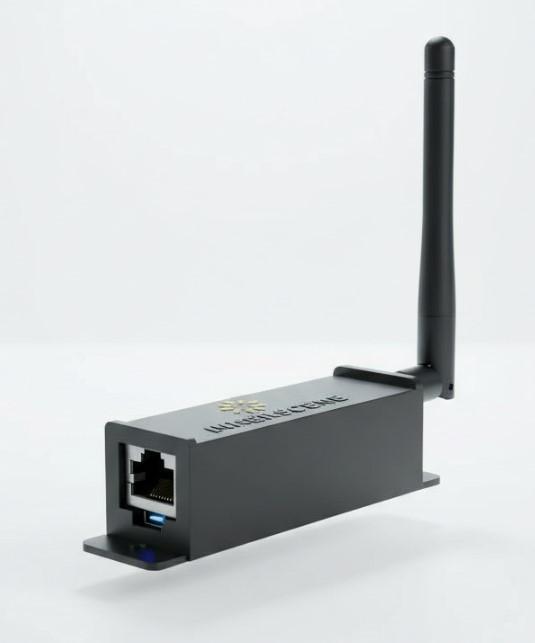
Innerscene Mini Hub (Included)
View Product Details →For extended range or network-based deployments, the Innerscene Mini Hub receives SkySync data and broadcasts it to Innerscene fixtures over the local network or via Innerscene Cloud Services.
Power Options
PoE (IEEE 802.3af) or USB-C
Network Connectivity
Ethernet (DHCP) or WiFi (configured via web UI)
Output Modes
Local Network (UDP) or Cloud Services (TCP)
Ideal for: Large commercial installations, multi-floor deployments, and remote locations
Fixture Control Options
Schedule Mode
Fixtures follow real-time SkySync data to replicate exterior lighting conditions
See what SkySync controls in the guide →Dimmer Override Mode
External dimming control overrides schedule programming
See the SkySync override on the schedule →Auto-Switching: Fixtures automatically detect external control signals and return to schedule mode when dimming is idle, power cycle occurs, or via app control.
Simple Installation
Get up and running in minutes with our straightforward installation process
Choose Window Location
Select any window with clear sky view for optimal sensing
Mount Device
Peel adhesive backing and press onto interior window at recommended angle
Configure Connection
Set up wireless connection via Innerscene Bluetooth app
Pair with Fixtures
Connect SkySync to your Circadian Sky or Virtual Sun fixtures
Mounts inside the window so it reads the same light your space sees, capturing color shifts from tinted or low-iron glass with zero maintenance. An optional CCT boost can nudge the result warmer or cooler to match the room.
See SkySync in the App
SkySync is set up and monitored right from the Innerscene app on your Circadian Sky and Virtual Sun fixtures. Step through the screens below to see how it works.
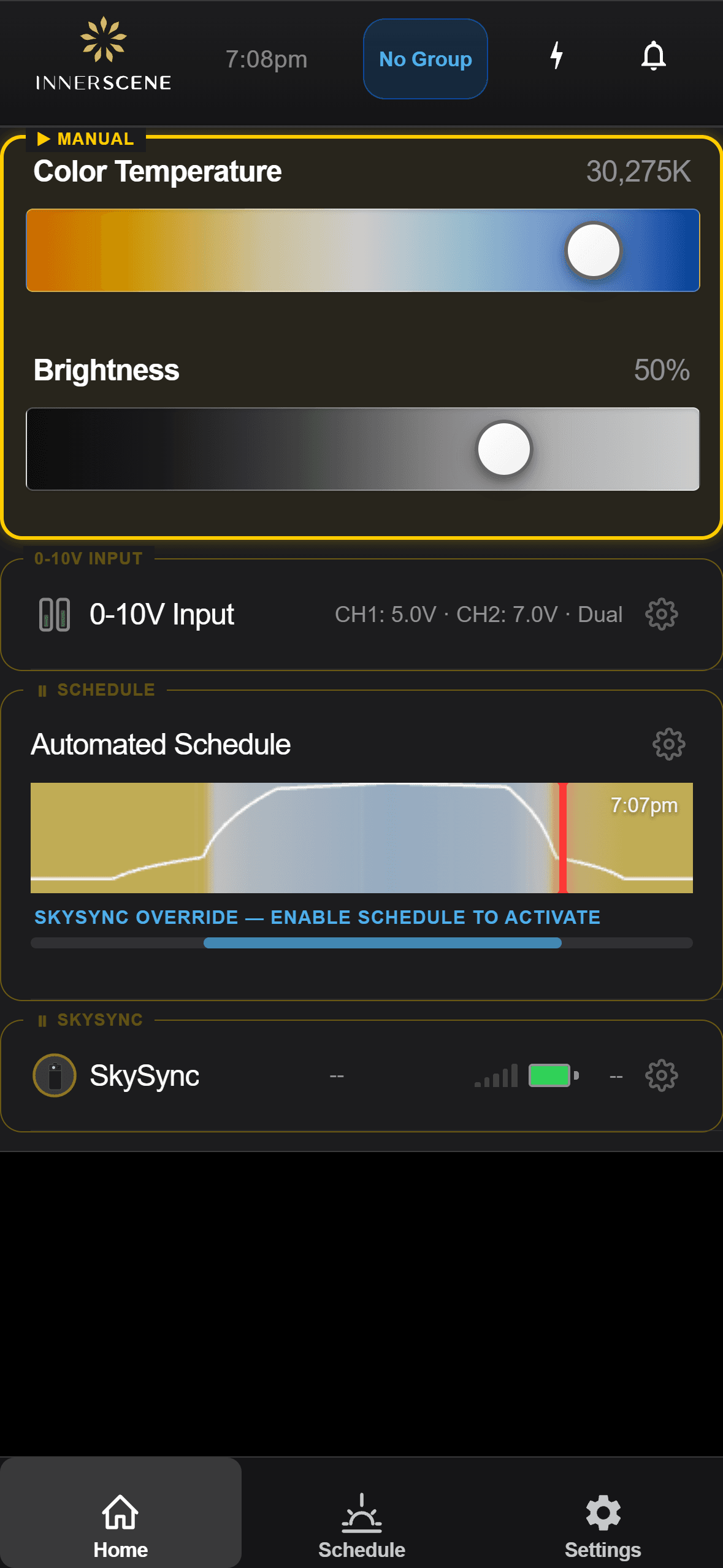
Sensor Detected
A fixture discovers a nearby SkySync and offers to pair with it.
Open in the guide →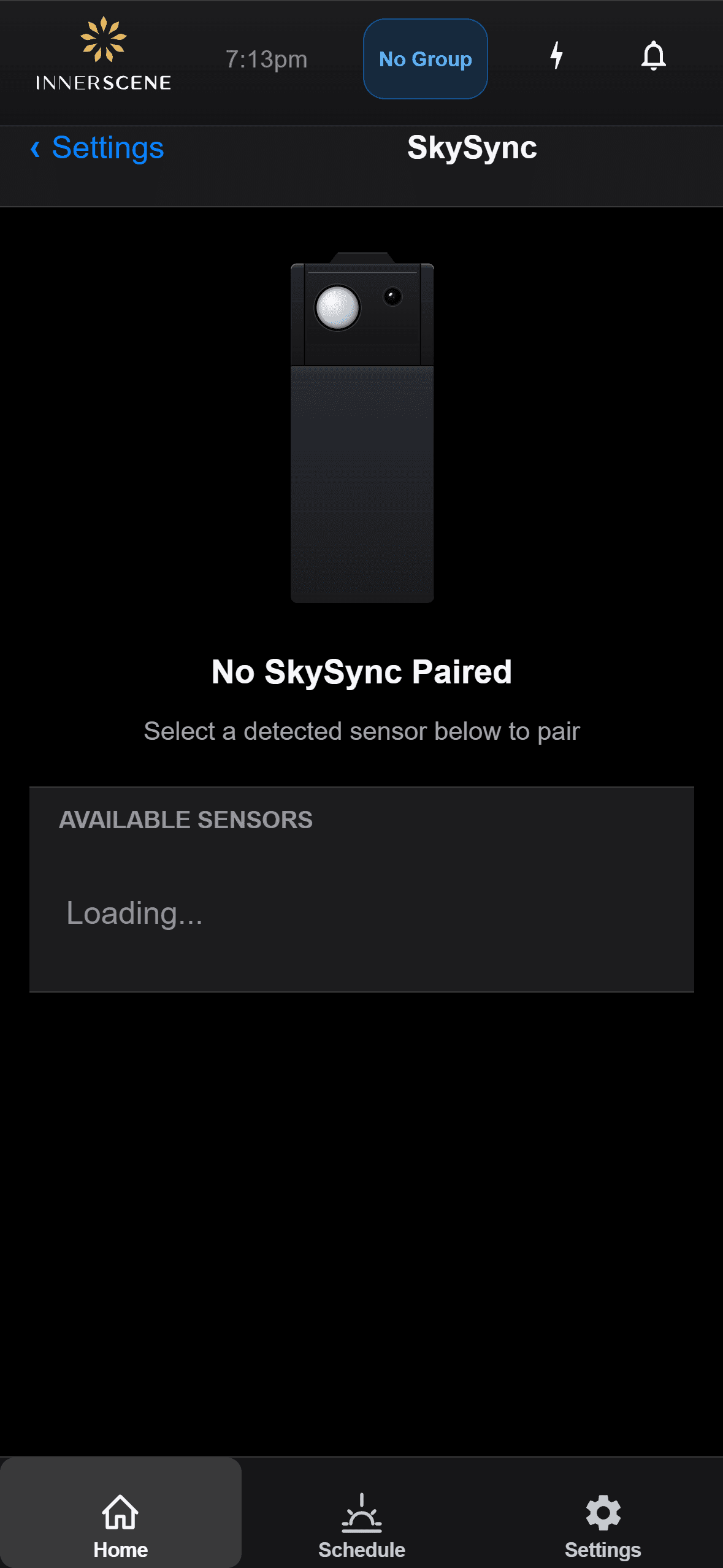
Pairing
Pair a SkySync sensor to a fixture, or unpair it to switch sensors.
Open in the guide →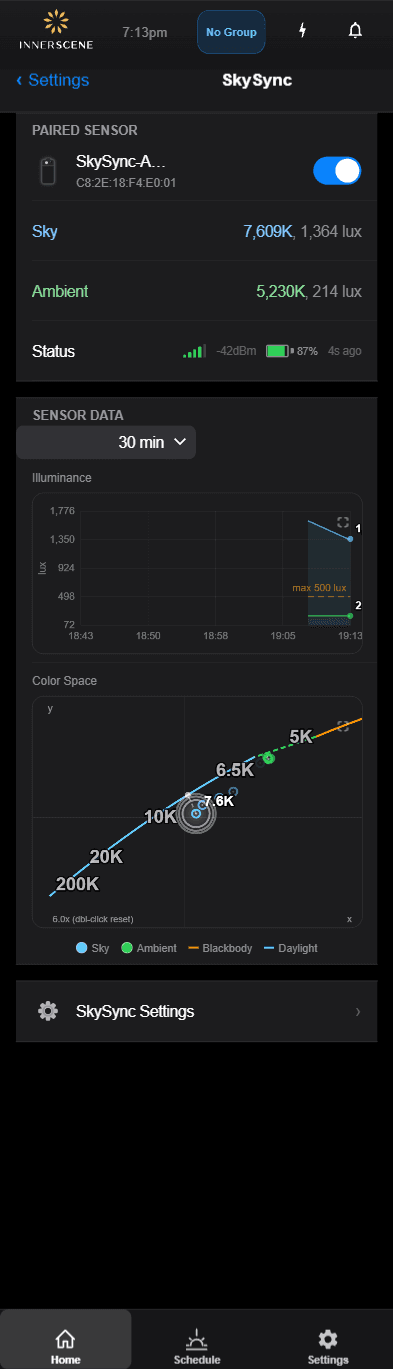
Live Readings
View the real-time sky color and brightness coming from the sensor.
Open in the guide →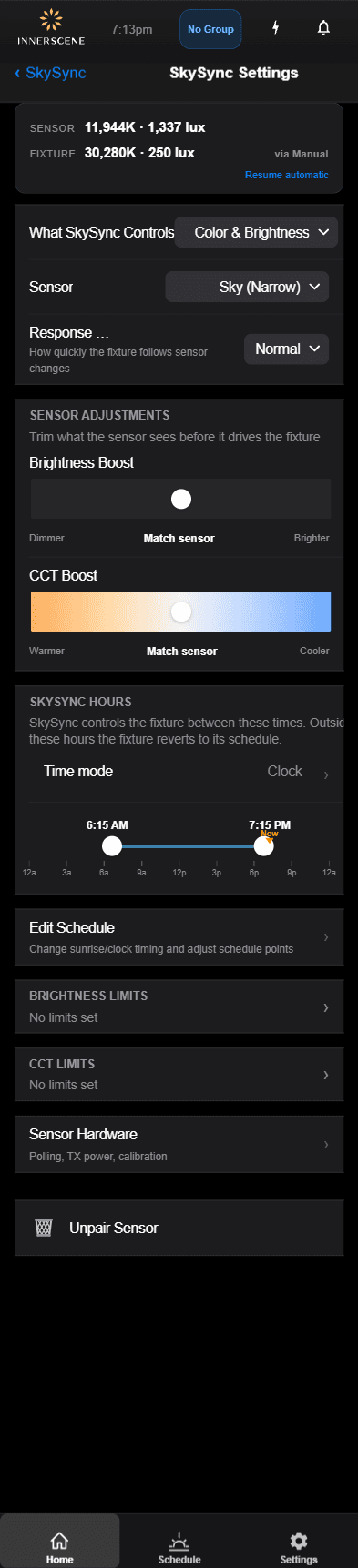
SkySync Settings
Tune how the sensor drives color temperature and brightness indoors.
Open in the guide →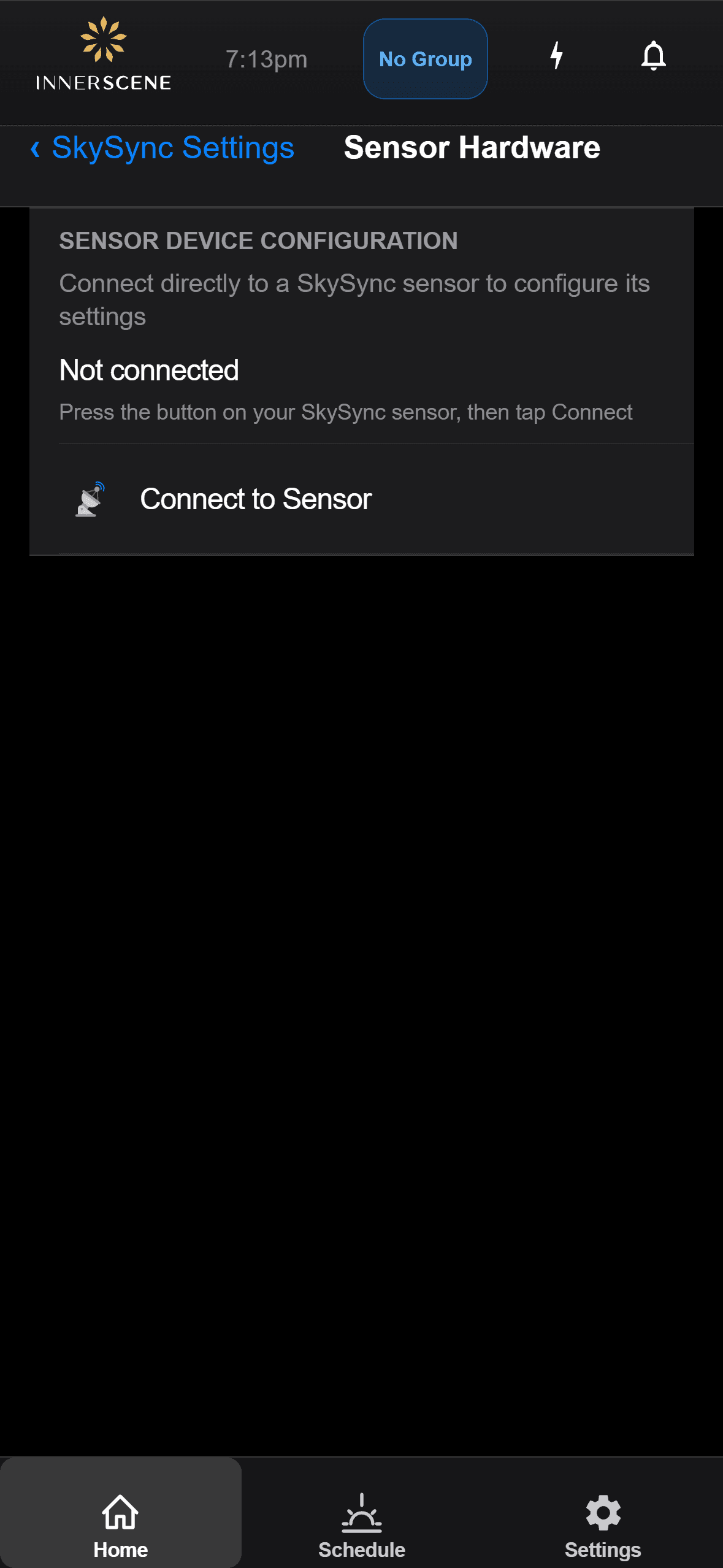
Sensor Hardware
Check battery level, signal strength, and hardware status.
Open in the guide →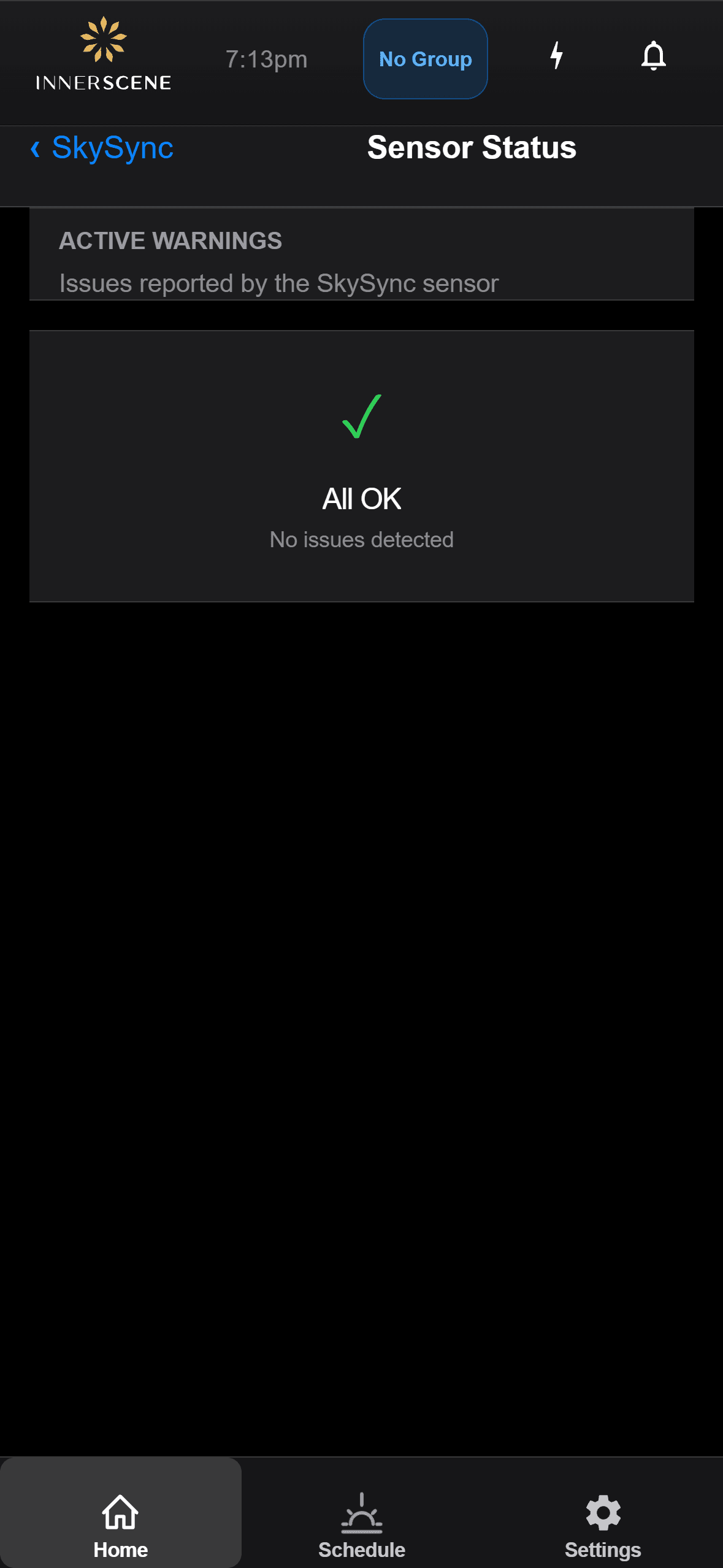
Troubleshooting
Understand sensor status messages and resolve common issues.
Open in the guide →Perfect Compatibility
SkySync seamlessly integrates with our entire product ecosystem
Unified Lighting Ecosystem
Natural Synchronization
All fixtures respond to real outdoor conditions in perfect harmony
Energy Efficient
10+ year battery life requires no external power source
Reliable Performance
Dual-sensor design ensures accurate readings in all conditions
Works with Circadian Sky
Circadian Sky's wide-spectrum technology can replicate the full range of sky colors — from warm 2,200K sunset tones to vibrant 200,000K+ blue sky — making it the perfect match for SkySync's breakthrough sensing capabilities. Together, they bring the true, constantly changing color of the sky indoors.
- ✓Full-spectrum color replication up to 200,000K+
- ✓Real-time synchronization with outdoor sky conditions
- ✓Dynamic transitions as clouds and weather change
Works with Virtual Sun
Virtual Sun's wide-spectrum technology replicates the sun's full color range throughout the day, from warm sunrise tones to vibrant blue sky. Paired with SkySync's real-time sensing, Virtual Sun moves and changes color in perfect harmony with the actual sun and sky outside.
- ✓Wide-spectrum replication from warm sunrise to vibrant blue sky
- ✓Synchronized sun position, intensity, and color
- ✓Real-time cloud coverage and atmospheric effects
Extend Your Range with the Mini Hub
Every SkySync ships with the Innerscene Mini Hub, a compact gateway that carries real-time sky data to fixtures beyond SkySync's direct wireless range. When walls, distance, or multiple rooms get in the way, the Mini Hub keeps your whole space in sync.
The Mini Hub receives real-time sky color data from SkySync and relays it to Innerscene fixtures (Virtual Sun and Circadian Sky) three ways: a wireless rebroadcast on a stronger radio that needs no network or setup, a local network (UDP) broadcast, or Innerscene Cloud Services (TCP) for remote locations.
With Power over Ethernet (PoE) and USB-C power options, plus WiFi or Ethernet connectivity, the Mini Hub adapts to any installation, from a single room to a multi-site deployment.
Wireless Relay
Rebroadcasts on a stronger 2.4 GHz radio (Innerscene proprietary). Extends range with no network or setup.
Local Network
Broadcasts sky data to fixtures over your LAN via UDP.
Cloud Services
Relays via Innerscene Cloud Services (TCP) to reach remote fixtures.
Flexible Power
Power over Ethernet (PoE) or USB-C.
Dual Connectivity
WiFi or Ethernet (DHCP).
Mini Hub Specifications
| SkySync Reception | BLE (Bluetooth Low Energy), 50 ft range |
| Power Input | PoE (IEEE 802.3af) or USB-C |
| Power Consumption | 0.5W |
| Network - Ethernet | 10/100 Mbps, DHCP auto-configuration |
| Network - WiFi | 2.4 GHz, configured via web UI |
| Wireless Rebroadcast | 2.4 GHz ISM band (Innerscene proprietary, no network required) |
| Local Network Output | UDP broadcast |
| Cloud Connection | TCP to Innerscene Cloud Services (SSL encrypted, outbound only) |
| Compatible Fixtures | Innerscene Virtual Sun, Circadian Sky |
| Operating Temperature | 0°C to 40°C (32°F to 104°F) |
| Mounting | 2 screws (mounts to any surface) |
Frequently Asked Questions
Common questions about SkySync setup, integration, and operation
When SkySync is paired with Circadian Sky fixtures, you have flexible options to integrate with external dimming systems:
Power On State → Schedule
Fixtures follow SkySync as part of their schedule. Set the fixture's Power On State to "Schedule" so that on power-up it resumes the schedule, and whenever the schedule's timeclock is within the SkySync override period (and SkySync is online, within its operating hours, and reading enough light), the fixture copies color and brightness directly from SkySync instead of the programmed schedule.
For a few seconds after power-up the fixture ignores external dimming input while it applies this state. (This grace period is skipped if the Power On State is set to read the dimmer.)
Exiting SkySync mode: Any change to the external controls will immediately exit SkySync mode, and the fixture will follow the external control signals. The specific trigger depends on your control type:
- 0-10V: More than a 2V change is detected (default, adjustable)
- DMX: Any difference in DMX frame values (after the 1st second)
- DALI: Any change in dimming or CCT (after the 1st second)
- Casambi: Any change in dimming or CCT (after the first ~2 seconds)
Returning to SkySync mode: After manual override, there are two ways to return to SkySync:
- Power cycle: Turn the fixture off and back on via a relay or light switch—the fixture will re-enter SkySync mode on startup
- Idle Resume: If configured, the fixture will automatically return to SkySync after the specified idle period (see below)
Idle Resume → Schedule
Idle Resume sets how long the fixture honors a manual override before automatically returning to its schedule. Choose a duration (e.g., 10 seconds, 1 hour, up to 24 hours, or Never); after that period with no further changes from a dimmer or the app, the fixture resumes the schedule and picks SkySync back up during the override period.
Example: If Idle Resume is set to 1 hour and someone adjusts the lighting using a wall dimmer, the fixture will follow those manual settings for 1 hour before automatically returning to its schedule and SkySync's real-time sky data.
This design allows occupants to temporarily override SkySync for specific needs (presentations, focused work, etc.) while ensuring the space automatically returns to natural daylight simulation without any manual intervention.
Related Help Topics:
Using the fixture's built-in app or web interface, you can adjust SkySync brightness scaling to fine-tune how the sensor readings translate to fixture output:
- Scaling up: Compensates for dark tinted windows by amplifying the sensor readings to deliver brighter interior light levels.
- Scaling down: Reduces the brightness response for environments where you need to control maximum brightness levels, such as media rooms or spaces with specific lighting requirements.
These adjustments ensure that regardless of your window glazing or environmental conditions, indoor lighting can accurately reflect outdoor conditions at your desired intensity.
Related Help Topics:
For new orders: If SkySync is purchased with an Innerscene fixture order, it will be paired and configured prior to shipping. No onsite commissioning is required—simply stick it to a window and adjust the sensor angle to point at the sky.
For existing installations: SkySync can be added to existing projects through the following steps:
- Upgrade fixture firmware (can be done through any WiFi-capable device: phone, PC, or tablet)
- Pair SkySync using the Web UI or Innerscene's mobile phone app
- Set the Power On State to Schedule and configure the SkySync override period and Idle Resume settings as desired
Related Help Topics:
In most cases, a single SkySync sensor is all you need—even for large buildings or multi-building campuses.
How it works: Primary/Secondary System
Innerscene uses a Primary/Secondary control system. The Primary fixture is paired to a SkySync sensor and should be located closest to it. The Primary determines the appropriate color and brightness for its wireless group, then sends digital packets to Secondary fixtures so they synchronize precisely.
Multiple Primary fixtures can be paired to a single SkySync sensor, provided they are within direct wireless transmission range (~30ft).
Unlimited Range with Network Modes
If fixtures are not within direct wireless range of SkySync, using a Local Network or Cloud Relay configuration allows for unlimited range. A single SkySync sensor could provide real-time sky data for an entire campus or large multi-story building.
The only reason to use multiple SkySync sensors would be if you specifically want different areas of a building to track different sky views (e.g., north-facing vs. south-facing windows).
Related Help Topics:
SkySync is designed for indoor use only. Mounting the sensor inside a window provides several important benefits:
- Accurate color measurement: When mounted inside the glass, SkySync records the accurate sky color as seen by people indoors—including any color shifts that occur due to iron content in glass or light attenuation through the window.
- Not waterproof: SkySync's electronics are not designed for exposure to rain, humidity, or other outdoor moisture conditions.
- UV protection: UV light is very harsh on electronic components. Indoor mounting means most UV light is reflected away by the window glass, extending the sensor's lifespan.
- No cleaning required: In outdoor conditions, SkySync would need regular cleaning due to rain spots, dust, pollen, and debris. When mounted indoors, we don't expect SkySync to need cleaning except in very dusty environments—and if it does, a strong puff of air is sufficient to remove any dust particles.
- Better wireless range: Indoor mounting allows for longer, more reliable wireless transmission to your Circadian Sky fixtures without interference from building materials.
SkySync is compatible with all Circadian Sky control variants:
In each case, SkySync works alongside your existing control system. External controls can override SkySync when needed, and fixtures can be configured to return to SkySync via the Idle Resume setting.
Related Help Topics:
SkySync offers four flexible communication paths to suit different installation scenarios:
1. Direct Wireless
SkySync broadcasts directly to fixtures within ~30ft range via 2.4 GHz wireless. No network infrastructure required—ideal for single rooms or small spaces.
2. Wireless Relay
The Innerscene Mini Hub rebroadcasts SkySync data on a stronger 2.4 GHz radio. Place it within ~30ft of SkySync and ~50ft of a fixture; a Secondary fixture can relay another ~50ft to the Primary. No network, router, or on-site configuration required.
3. Local Network
The Innerscene Mini Hub broadcasts UDP packets over your local network. Use the Innerscene Studio app to connect the Mini Hub and at least one Circadian Sky fixture to the network. Best for large buildings or multiple rooms.
4. Cloud Relay
Sky data is relayed through Innerscene Cloud Services to fixtures in remote locations or separate network segments (also set up with the Innerscene Studio app). Perfect for multi-building campuses.
Related Help Topics:
Setting up Local Network mode requires connecting both the Innerscene Mini Hub and your Circadian Sky Primary fixture to the same local network:
- Configure the Innerscene Mini Hub: The hub provides a direct Web UI. Connect to its WiFi hotspot and use the interface to connect it to your local wireless router. Alternatively, connect via Ethernet for automatic DHCP configuration.
- Configure the CS Primary Fixture: Follow the same process—connect to the fixture's WiFi hotspot and configure it to join your local wireless router.
- Automatic Discovery: When both devices are on the same subnet, the Innerscene Gateway will send UDP broadcasts that the Circadian Sky fixture automatically picks up.
No manual pairing is required once both devices are on the same network—they will discover each other automatically.
Related Help Topics:
Cloud Relay mode builds on the Local Network setup with an additional cloud registration step:
- Complete Local Network Setup: First, configure both the Innerscene Mini Hub and Circadian Sky Primary fixture to connect to their respective local networks (they can be on different networks).
- Register for Innerscene Cloud Services: Using the local Web UI on both the Hub and the CS Primary fixture, sign up for Innerscene Cloud services.
- Use the Same Email: Important—register both devices using the same email address. This links them together in the cloud system.
Once registered, the Gateway will upload sky data to Innerscene Cloud, and your fixtures will download it regardless of their physical location or network configuration.
Related Help Topics:
Have more questions?
Visit our complete Help Center